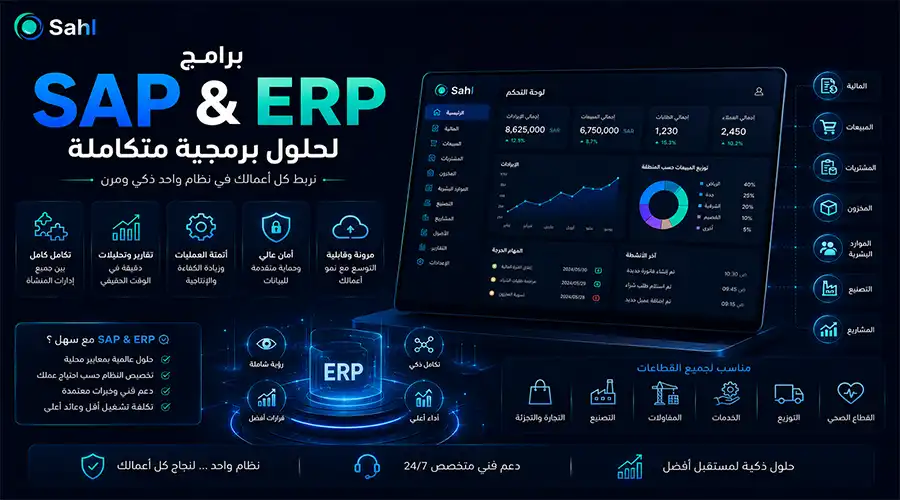


As Saudi companies expand and increase their branches, employees, and daily operations, relying on disconnected software for accounting, inventory, sales, and human resources becomes a primary cause of data duplication, delayed reporting, and difficulties in tracking true business performance. This is where the utmost importance of SAP programs and Enterprise Resource Planning (ERP) solutions emerges—helping businesses link departments and operations within a single centralized platform where data flows systematically and accurately between financial management, sales, purchasing, inventory, and human resources.
An enterprise may need an integrated SAP ERP system, a custom ERP system tailored precisely to its business nature, or a multi-branch cloud ERP system allowing management to monitor operations from anywhere at any time. Many companies also look for mid-market ERP solutions in Saudi Arabia to help them manage sustainable growth without the need to immediately transition to massive, complex systems that exceed their true needs and allocated budgets.
This article, presented by Sahltech, explores the core differences between SAP programs and ERP systems, how to choose the right system for your business, alongside expected implementation timelines and costs.
What are SAP Programs and ERP Systems?
The phrase "SAP programs and Enterprise Resource Planning (ERP) solutions" refers to an integrated suite of digital systems that help organizations plan their resources and manage core operational processes through a centralized database and interconnected functional modules.
This includes managing the following aspects:
Accounts and financial management.
Sales and customer service.
Purchasing and vendor relationship management.
Inventory and warehouses.
Human resources and administrative affairs.
Production and manufacturing lines.
Projects and contracts.
Fixed and movable assets.
Multiple branches and locations.
Analytical reports and metric dashboards.
Permissions, hierarchies, and administrative approval workflows.
The primary goal of these systems is not merely transforming paper transactions into electronic documents, but rather unifying data and connecting departments together so that registering a single transaction instantly updates all related parts. For example, when a sale is recorded, the system automatically updates the customer's balance, issues the tax invoice, reduces inventory item quantities, records the financial revenue, and feeds updated data into financial reports.
This is the core essence of ERP integration with inventory, sales, and purchasing; no department operates in isolation, and all sections rely on unified, real-time data sources.
What is an Enterprise Resource Planning (ERP) System?
ERP stands for Enterprise Resource Planning. It is an integrated software system that helps companies manage their core operations (such as finance, HR, manufacturing, supply chain, sales, and procurement) through a unified platform that provides a comprehensive view of business activities and a centralized source of information.
An ERP system typically consists of functional modules, where each module handles a specific sector of work while remaining directly linked to other modules via a shared database. Therefore, implementing ERP systems for financial and operational resource management effectively reduces manual data entry, standardizes administrative procedures, and increases the speed and ease of accessing accurate information.
What is SAP?
SAP is a global leader specializing in enterprise business process software, offering a wide and integrated suite of enterprise resource planning solutions and massive corporate systems. SAP ERP is one of the prominent solutions offered by the company to manage financial and operational processes and link corporate administrative structures.
SAP provides products and solutions tailored to various company sizes and unique needs, most notably:
SAP Business One (targeted at small and medium-sized enterprises).
SAP S/4HANA (for large corporations and massive enterprises).
SAP S/4HANA Cloud Public Edition (the public cloud edition).
SAP S/4HANA Cloud Private Edition (the private cloud edition).
SAP specialized solutions for finance, procurement, supply chain, and human resources.
Looking for the SAP or ERP solution best suited for your business? Contact Sahltech via WhatsApp at +966533879965, via email at support@sahltechit.com, or by filling out the quick contact form on our website.
CTA
Key Functional Modules in SAP and ERP Systems
The system contains interconnected functional modules, with active functions varying based on the nature of the enterprise's activity and project scope:
Not every enterprise requires all these modules running simultaneously; you can start with core modules (finance, sales, purchasing, inventory) and expand by adding other modules gradually as the business grows and prospers.
Components of SAP and ERP Programs
These software solutions consist of essential layers and elements working in complete harmony to provide an integrated system:
Centralized Database: All customer, vendor, product, financial account, employee, and process data are stored in a single centralized data repository, completely eliminating data duplication and discrepancies across different departments.
Functional Modules: Interconnected software sections, each managing a specific business sector with seamless real-time data exchange.
User Interface: Provides interactive screens, data input forms, and flexible dashboards used by employees to efficiently execute daily tasks.
Workflows and Approvals: Precisely defines the route of each administrative or financial transaction (such as routing a purchase requisition from the concerned employee to the department manager, then to the finance department before final approval).
User Permissions and Levels: Allows strict control over viewing, adding, editing, or approving permissions for each user based on their job role and responsibilities.
Reports and Dashboards: Displays live indicators of financial and operational data (sales volume, total costs, inventory balances, cash liquidity, and branch profitability).
Integration and Connection Tools (APIs): Connects the system to websites, digital storefronts, mobile apps, Point of Sale (POS) systems, electronic payment gateways, and shipping/external service providers.
Cloud or On-Premise Infrastructure: Options to run the system on local servers within the company's premises, via cloud environments (public or private), or within hybrid models combining both.
Features of SAP Programs and ERP Systems
SAP and ERP software solutions help companies organize operations and improve data quality. Their most notable features include:
Unified Enterprise Data: Provides a single source of truth, preventing numerical discrepancies between accounts, sales, and warehouses.
Real-Time Operation Linking: Instantly updates all related parts as soon as any sale, purchase, or inventory receipt is completed.
Reduced Manual Entry: Automatically passes data between functional modules, minimizing human effort and associated errors.
Instant Reporting: Empowers executive management to monitor financial and operational performance second by second via interactive dashboards.
Multi-Branch Management: Provides a cloud system enabling the management and monitoring of distant branches and warehouses from a single centralized location.
Tightened Security and Permissions: Implements strict controls over user permissions, audit trails, and financial approval hierarchies.
Support for Growth and Expansion: High system scalability to add users, new branches, or advanced functional modules as commercial activity grows.
Improved Quality of Administrative Decisions: Relies on accurate, updated data to objectively evaluate the performance of products, markets, and branches.
Industry Customization: Ability to configure the system to fit the workflows of commercial, industrial, service, or contracting activities.
Having a massive number of features does not always mean a system is the best fit; the optimal choice is one that accurately fulfills the company's actual needs without unjustified complexity or exorbitant costs.
CTA
Types of ERP Systems Available in the Saudi Market
Software systems vary widely, and the most suitable one is chosen based on the enterprise's size, nature of activity, and number of branches:
SAP offers a public cloud version of SAP S/4HANA, and also provides a private cloud version for businesses that need broad functional scope and greater flexibility in customization and operation. (SAP Help Portal) To find ERP solutions for medium-sized businesses in Saudi Arabia, you must balance speed of implementation, ready-made functionality, customizability, and future cost, rather than choosing a system based solely on brand reputation.
CTA
Fundamental Differences Between SAP Programs and General ERP Systems
Frequent confusion occurs between the two terms; the following comparison clarifies the nuanced differences:
In summary, SAP does not represent an alternative to the concept of ERP; rather, SAP is one of the most powerful provider companies of global ERP systems. The correct choice depends entirely on the company's needs, available budget, and operational scale.
Steps for Successful Implementation of SAP and ERP Systems
The success of any enterprise software system relies as much on proper implementation methodology as it does on the system's technical power:
Analyze the Enterprise's Current State: Study existing departments, workflows, and software in use, pinpoint problems to be resolved, and determine the number of branches, users, and volumes of financial and inventory movements.
Define Project Objectives Precisely: Formulate targeted outcomes clearly (such as reducing report preparation time, unifying branch data, controlling inventory, accelerating the purchasing cycle, and improving collection liquidity).
Document Operational Workflows: Map and document the lifecycle of each process from beginning to end, defining responsibilities, approval levels, and required outputs.
Select the Right System and Modules: Determine whether the enterprise needs a ready-made system, a custom system, SAP ERP, or a multi-branch cloud system, while choosing phase-one modules (finance, sales, purchasing, inventory).
Design the Software Solution: Draft preliminary designs for screens, reports, permissions, approval pathways, and technical integration points.
Configure and Set Up the System: Begin configuring functional modules, entering business rules, developing activity-specific functions, and setting up forms and reports.
System Integration and Data Connection: Execute ERP integration with inventory, sales, and purchasing, connecting the system to websites, digital storefronts, mobile apps, POS terminals, and electronic payment gateways.
Data Cleansing and Migration: Remove duplicate records, standardize the naming conventions of items, customers, and vendors, and accurately review opening balances prior to transfer.
System Testing: Conduct comprehensive testing for each module individually, testing data flow, permissions, report accuracy, stress/load tolerance, and realistic business scenarios.
User Training: Provide practical, targeted training programs tailored to each user based on their specific job roles rather than a generic, distracting general overview.
Pilot Run: Operate the system on a restricted, limited scale, compare its outputs with current actual operations, and address any feedback before moving to a full rollout.
Official Launch and Ongoing Support: Lift the curtain on legacy software and formally launch the new system, while monitoring users, providing necessary technical support, and measuring success and performance metrics.
With Easy Tech, we start by analyzing your facility's operations before proposing the required system or functionality. To consult about SAP programs and the ERP system for software solutions, contact us via WhatsApp +966533879965, email support@sahltechit.com, or fill out the quick contact form on our website.
CTA
Expected Implementation Timelines for SAP and ERP Projects
Implementation timeframes vary based on enterprise size, system type, active modules, integration scale, and data readiness:
Factors Affecting Implementation Duration:
Speed of administrative decision-making
clarity of project scope and fixed requirements
data readiness and cleansing
degree of cooperation across departments
number of custom software developments required
technical integration levels
availability of a dedicated internal project team
speed of testing and approvals.
The implementation time of SAP and ERP software solutions can be reduced by selecting ready-made functions, reducing customization, and launching the system in phases. Implementing ERP systems for resource and financial management with multiple allocations and transfer of large amounts of data requires a more detailed plan and longer testing time.
Challenges of Implementing ERP and SAP Systems in the Saudi Market & How to Overcome Them
Companies may face a set of challenges when implementing an ERP system, even if the system is technically robust.
Unclear Requirements: The enterprise may start the project without precisely defining the problems and required functions, leading to scope creep, increased costs, and extended timelines.
Employee Resistance to Change: Some employees may reject the new system due to familiarity with old spreadsheets or legacy software, or out of fear of changing responsibilities.
Poor Data Quality: Legacy data may contain duplication, omissions, or inconsistencies in product, customer, and account names.
Exaggerated Customization: Attempting to turn every legacy step into a customized function within the system raises costs and makes updates and maintenance much more complex.
Choosing an Over-Sized System: An enterprise might choose a massive system simply because of its brand name, even though its operations could be managed with a simpler, less costly solution.
Choosing a Limited System: Conversely, a low-cost system might be chosen that fails to support future expansion, multiple branches, or integrations.
System Integration Difficulties: An enterprise might use different e-commerce stores, POS terminals, applications, and shipping/payment systems, making integration more complex. Careful planning is required to execute ERP integration with inventory, sales, and purchasing to prevent data duplication or balance discrepancies across systems.
Inadequate Training: The system might be launched after brief training that fails to cover daily work scenarios, leading to usage errors.
Varying Branch Requirements: When implementing a multi-branch cloud ERP system, sales methods, inventory processes, or permissions may vary between branches, requiring procedures to be standardized or exceptions clearly defined.
Poor Project Management: The absence of defined responsibilities, timelines, and decision-approval mechanisms leads to project delays and conflicting directions.
How to Overcome ERP Implementation Challenges
The risks of implementing SAP programs and ERP software solutions can be mitigated through a set of practical actions:
Define a Clear Scope: The modules, functions, reports, and integrations included in each phase must be clearly defined without adding new requirements without evaluating their impact.
Appoint an Internal Project Team: It is best to select a representative from each department, alongside a project manager who has the authority to monitor and make decisions.
Start with Core Operations: Finance, sales, purchasing, and inventory can be launched first, followed later by human resources, production, or project management.
Cleanse Data Early: Do not wait for the migration phase to start reviewing data; it is better to clean up customer, vendor, item, and account lists right from the start of the project.
Minimize Unnecessary Customization: A clear distinction must be made between functions necessary for the nature of the business and legacy procedures that can be improved rather than programmed exactly as they were.
Conduct Practical Testing: Real-life scenarios must be tested, such as sales, returns, purchasing, partial receipts, inter-branch transfers, and stock counts.
Train Employees by Role: A warehouse employee requires different training than an accountant, sales representative, or branch manager.
Provide Post-Launch Support: Users must be monitored during the initial period to address issues and correct procedures before they turn into recurring errors.
Measure Results: After system implementation, indicators should be measured, such as: report preparation time, inventory accuracy, order fulfillment time, purchasing approval cycle, number of manual errors, collection speed, and operating costs.
Through careful planning, team training, and performance monitoring after launch, an enterprise can overcome the challenges of implementing SAP programs and ERP software solutions and maximize the value derived from the system.
Criteria for Choosing the Right ERP System for Your Business
Identify Current Problems and Workflow Bottlenecks: Understand where data is duplicated, why reports are delayed, and precisely where inventory and accounting match issues occur.
Align Enterprise Scale and Growth Aspirations: Choose a system that scales with the opening of new branches and markets (such as preferring multi-branch cloud solutions for rapidly expanding companies).
Determine Essential Modules First: Start with urgent basics (finance, inventory, sales, and purchasing) before expanding to sub-modules.
Evaluate User Experience and Ease of Use: Ensure smooth interfaces free from unjustified operational complexities for the daily team.
Verify Integration and Connectivity Efficiency: Ensure smooth technical connection with external platforms, e-commerce stores, and POS terminals.
Review Reporting Quality and Dashboards: Verify the system's ability to answer financial and administrative questions accurately and in real-time.
Calculate Total Cost of Ownership (TCO): Calculate comprehensive costs including licenses, implementation, customization, data migration, training, support, and future updates.
Evaluate Technical Support Level and Provider: Confirm the service provider's competence and capability in delivering rapid technical support, periodic maintenance, and high responsiveness to malfunctions.
Integrated SAP and ERP Solutions with "Sahltech"
At Sahltech, we fully understand that no single software system fits all companies with the exact same strength, as every enterprise differs in activity, size, branch count, and internal workflow. Therefore, we offer a comprehensive package of Point of Sale (POS) solutions, Customer Relationship Management (CRM) systems, and Enterprise Resource Planning (ERP) systems to help Saudi companies accurately analyze their needs and select or develop the optimal solution.
Our professional services in this field include:
Conducting a comprehensive analysis of the enterprise's operations and administrative structure.
Documenting sales, purchasing, and warehouse workflows.
Designing and developing custom ERP systems that precisely meet activity needs.
Developing and building advanced financial and accounting management.
Managing customer and supplier relationships.
Controlling inventory and warehouses with extreme precision.
Managing multiple branches, users, and permissions.
Designing and implementing multi-branch cloud ERP systems.
Executing comprehensive integration between ERP, inventory, sales, and purchasing.
Technical connection with websites, digital storefronts, and mobile applications.
Direct connection with certified POS hardware and electronic payment gateways.
Designing professional reports and interactive indicator dashboards.
Managing data migration and cleansing operations from legacy systems with absolute safety.
Providing specialized training programs for users based on their job roles.
Providing ongoing technical support and future development services.
We also offer specialized consultations to help medium-sized companies in Saudi Arabia study ERP solutions and determine the most appropriate system type (ready-made, custom, or multi-branch cloud). In cases where an enterprise specifically wishes to implement SAP ERP solutions, we assist in evaluating licensing requirements, implementation, and integration in cooperation with specialized consulting bodies.
Transform your enterprise operations from fragmented, disconnected programs into a smart, interconnected central system!
Contact the Sahltech team today via WhatsApp at: +966533879965, via email at: support@sahltechit.com, or by filling out the quick contact form on our website, and our specialized team will reach out to discuss all details regarding SAP programs and ERP systems.
CTA