

If you are looking for a way to grow your business and manage your sales with flexibility and ease, you have certainly asked yourself: What is a POS system? Today, technology provides solutions that make it easy for business owners to manage their branches with absolute precision, which is why understanding POS systems is essential.
In this article, you will learn what a POS system is, its importance in scaling your business, and how to avoid errors in accounting and inventory. Read on to discover more about these systems and how to choose the right one for you.
What is a POS System?
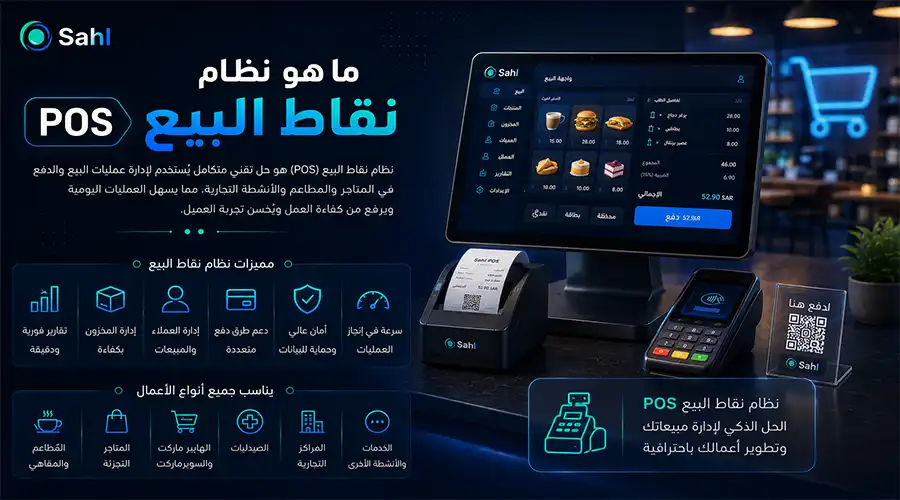
A POS (Point of Sale) system is an advanced software solution that acts as a central hub for completing sales, processing payments, and issuing invoices. Modern companies rely on cloud POS solutions for businesses in Saudi Arabia because they go beyond simple payments, incorporating advanced customer management and accurate daily branch sales reporting.
This secure integration ensures real-time data synchronization across local and cloud servers compliant with Saudi regulations, clearly defining what a POS system is.
What is a Point of Sale?
A point of sale is the exact moment or place where a customer completes the payment for their purchases in your store. Technically, it is an integrated software solution that allows merchants to process payments, issue certified electronic invoices, and update inventory simultaneously.
Most successful companies today rely on cloud POS solutions in Saudi Arabia to track sales and manage operations from anywhere at any time with total security.
Components of a POS System
Any professional POS system consists of two fundamental and complementary parts:
Software: The brain of the operation. The current best practice is to adopt cloud-based POS solutions in Saudi Arabia for high flexibility and reliability, allowing you to generate daily branch sales reports at the click of a button.
Hardware: The physical equipment such as touch screens, barcode scanners, cash drawers, receipt printers, and payment terminals (Mada or STC Pay). Note that physical POS hardware costs vary depending on component quality and brand.
Contact Sahltech for web and mobile app development to learn more about POS systems, receive a technical consultation, and get a custom POS system tailored to your business and 100% compliant with ZATCA regulations.
CTA
How a POS System Works
The process is streamlined, fast, and designed for maximum convenience:
The cashier scans the product barcode.
The system automatically calculates the total, including Value Added Tax (VAT).
The customer pays using their preferred method, triggering an e-invoice with a ZATCA-approved QR code via an e-invoice-compliant cash register system.
The system immediately deducts the sold quantity from the inventory, highlighting the importance of a POS system integrated with inventory and sales to prevent stockouts.
Uses of a POS System
Whether you own a retail store, a supermarket, or are looking for a restaurant POS system, the benefits are numerous once you understand what a POS system is:
Eliminates Queues: Fast interfaces clear customer lines in record time.
Prevents Fraud: Accurate calculations and drawer closing without human error.
Business Analysis: Provides daily branch sales reports so you can make data-driven decisions (peak hours, top-selling products).
Smart Inventory Management: A POS system integrated with inventory and sales alerts you to shortages so you can restock before items run out.
For optimal digital infrastructure, many business owners rely on specialized companies like Sahltech to develop and equip their systems. We offer tailored ERP, POS, and CRM business solutions designed specifically for your business growth.
The Importance of POS Systems
The acceleration of digital transformation in Saudi Arabia makes understanding POS systems not just technical knowledge, but a vital necessity for business growth. The system serves as the backbone for efficient daily operations, offering smart solutions to connect branches and increase profits:
Regulatory Compliance: Provides an e-invoice-compliant cash register system that directly and instantly links with ZATCA to avoid financial penalties.
Inventory Management & Operational Accuracy: Prevents financial deficits and phantom sales by instantly deducting sold quantities from inventory.
Remote Administrative Control: Delivers interactive dashboards with daily branch sales reports to track staff performance and cash flow in real time.
Sector Integration: Easily manages tables and kitchens for restaurants or links retail branches to the cloud.
Enterprise Support: Integrates smoothly with ERP, POS, and CRM solutions provided by Sahltech.
POS System Hardware Tools
To run your system at peak performance and avoid service interruptions, equipping your branches with the right hardware and software is essential. Key tools include:
Touch Screens: Fast interfaces used by cashiers to input orders and process transactions smoothly.
Barcode Scanners: Instantly retrieve product data and pricing in milliseconds, preventing manual data entry errors.
Thermal Receipt Printers: Issue immediate invoices featuring QR codes compliant with e-invoicing regulations.
Payment Terminals: Securely process payments via Mada, credit cards, and smart solutions like Apple Pay and STC Pay.
Cash Drawers: Open automatically upon cash transactions to protect funds and facilitate daily audits.
Certified Cloud Software: The most critical element, ensuring data is stored within encrypted and protected local servers.
Pros and Cons of POS Systems
Modern businesses cannot rely on isolated systems; they need an integrated POS and inventory sales system to ensure smooth operations by instantly deducting sold items from warehouse balances upon payment.
1. Pros of POS Systems
Real-Time Stock Synchronization: Direct links between the main warehouse and all branch POS terminals update numbers and alert management to low stock.
Dynamic Pricing & Promotions: Program automatic discounts and flexible pricing rules applied instantly at checkout without manual intervention.
Advanced Dashboards: Analytical screens showing employee performance, peak hours, and top-selling products.
Multi-User Permissions: Assign precise permissions to each cashier to protect the system and enforce strict financial control.
Offline Mode: Continue sales and local data storage during internet outages, syncing automatically upon reconnection.
2. Cons of Traditional Systems (And How We Solve Them)
Sudden Internet Outages: Resolved via Offline Mode, allowing cashiers to sell and print invoices offline, syncing data automatically once reconnected.
Regulatory Non-Compliance: Avoided by developing e-invoice-compliant cash registers integrated directly with official portals.
Inventory Discrepancies: Solved by integrating POS systems with e-commerce stores to update and deduct online sales from central inventory instantly.
Data Fragmentation: Overcome by implementing a centralized daily branch sales report system delivering financial insights directly to your phone.
Exorbitant Recurring Costs: Avoided by investing in custom cloud POS solutions in Saudi Arabia where you pay development costs once and retain full ownership without mandatory monthly renewal fees.
CTA
Types of POS Systems
Food & Beverage Systems: Specialized POS systems for restaurants and cafes featuring Kitchen Display Systems (KDS) and table management.
Advanced Cloud Systems: Ideal for retail, managed via secure servers enabling remote sales monitoring and price updates.
Comprehensive Warehouse Systems: POS systems fully integrated with inventory and sales, tailored for businesses handling thousands of items requiring strict batch and expiry tracking.
POS Systems vs. ERP Systems: The Difference
| Feature / Comparison | Point of Sale (POS) System | Enterprise Resource Planning (ERP) System |
| Primary Function & Role | Front-end: Handles fast sales, payment processing, and customer face-to-face invoicing. | Back-end: Comprehensive platform managing central enterprise departments (Accounting, HR, Procurement). |
| Target Users | Cashiers, field sales staff, shift supervisors, branch managers. | Executive management, CFOs, HR managers, supply chain leads. |
| Scope of Operations | Focuses on fast daily transactions (sales, returns, drawer closing). | Manages the entire business lifecycle (payrolls, vendor accounts, manufacturing, taxes). |
| Inventory Management | Deducts sold items from branch shelves and updates balances in real time. | Manages large-scale inventory cycles from purchase orders to distribution. |
| Financial Reporting | Generates daily branch sales reports for shift revenues and cashier performance. | Produces complex financial statements, balance sheets, and comprehensive P&L analysis. |
Small and medium enterprises benefit from combining both. Let Sahltech’s engineering experts build an interconnected system bridging fast POS front-ends with robust ERP back-ends customized for the Saudi market.
CTA
Requirements for Implementing a POS System in Saudi Arabia
Mandatory E-Invoicing: Integration with Phase 2 requirements mandated by ZATCA.
Data Encryption & Storage: Local secure hosting compliant with the Saudi Personal Data Protection Law (PDPL).
Cybersecurity Compliance: Alignment with National Cybersecurity Authority standards.
How to Choose the Right POS System
Comprehensive Integration: Choose a system connecting all branches and warehouses to a single error-free network.
Omnichannel E-Commerce Integration: Essential if you sell online to prevent inventory mismatches.
Live Analytical Reports: Never compromise on daily branch sales reports sent directly to your mobile phone.
Challenges of POS Systems & How to Overcome Them
| Operational Challenge | Radical Technical Solution |
| Sudden internet outages and sales halts | Programmed Offline Mode for continuous sales and automatic cloud synchronization upon reconnection. |
| Fines due to manual invoices | Deploying e-invoice-compliant cash registers printing encrypted QR codes instantly. |
| Inventory discrepancies between branches and online stores | API-based e-commerce integration for instant stock deduction. |
| Difficulty monitoring multi-branch performance remotely | Centralized daily branch sales reporting streamed directly to mobile devices. |
Contact us via WhatsApp at +966533879965, email us at support@sahltechit.com, or fill out the quick contact form on our website to learn more about POS systems and their importance.
CTA
Best Practices for Using a POS System
Team Training: Dedicate sufficient time to train your staff on interfaces to speed up customer service.
Data Utilization: Use figures to identify peak hours and top-selling items to launch targeted marketing campaigns.
Hardware Balance: Do not overspend on expensive hardware at the expense of software quality, as software drives your business.
The Best POS System in Saudi Arabia with Sahltech
At Sahltech, we translate your ideas into reality by providing custom cloud POS, CRM, and ERP solutions built on secure, high-speed local servers:
Custom restaurant POS systems supporting kitchen display systems and delivery apps.
Fully integrated inventory and sales POS systems to organize supplier relations and stock balances.
Take control of your business success today. Contact Sahltech's elite engineers for a technical consultation and build a powerful, integrated cash register system designed to increase profits and safely expand your branches!
CTA